● For Mac · Wi‑Fi & Bluetooth exposure meter

See the invisible signals around you.

WaveCheck listens to every Wi‑Fi network and Bluetooth device your Mac can hear, adds up your exposure and shows how far below international safety limits you are.

7 days free · One-time purchase · macOS 14 Sonoma or later · Apple Silicon & Intel

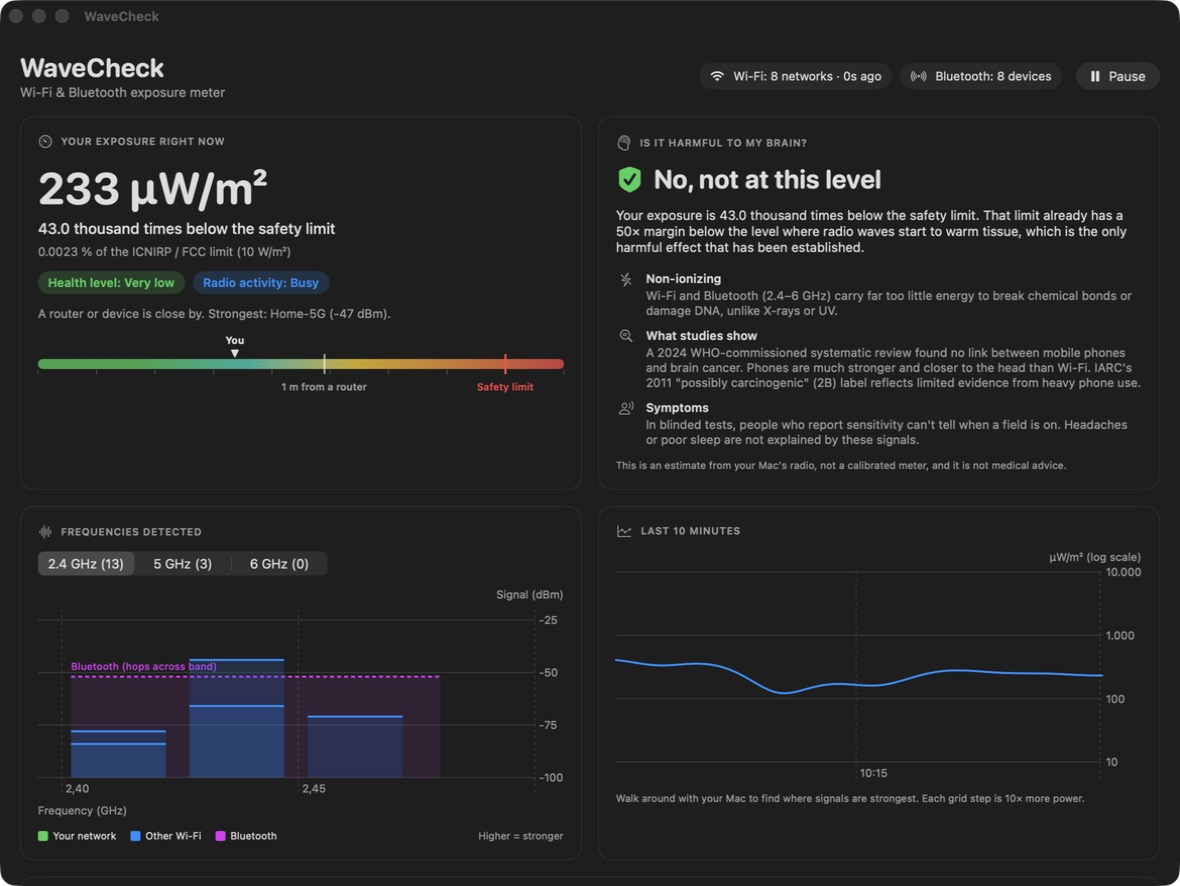
WaveCheck showing an exposure of 233 µW/m², 43,000 times below the safety limit, with a frequency chart and history graph

Everything your Mac can hear, measured.

No extra hardware. WaveCheck uses the Wi‑Fi and Bluetooth radios already in your Mac.

📶

Live exposure meter

Your total exposure in µW/m², updated every few seconds, on a scale that runs all the way up to the safety limit.

🧠

An honest health answer

A clear yes or no on whether your level is a concern, based on what the research actually shows rather than on fear.

〰️

Frequency map

See which channels are crowded on 2.4, 5 and 6 GHz, and which network is yours.

📋

Every source, ranked

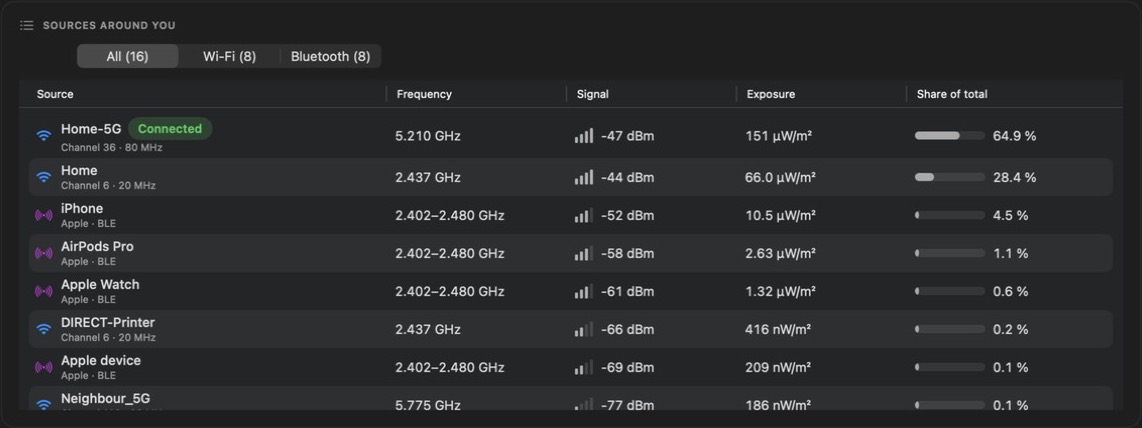
Routers, phones, earbuds, watches and more, with signal strength and each one's share of your exposure.

📈

10‑minute history

Walk around your home or office with your Mac and watch the graph to see where signals are strongest.

📏

Distance calculator

Estimate exposure from devices the meter can't see, like your own phone or earbuds, at any distance.

"Is Wi‑Fi bad for my brain?"

✓Not at everyday levels.

WaveCheck doesn't sell fear. It shows the measurement, compares it with the international limit and explains what the science says.

  • ⚡
    Non‑ionizingWi‑Fi and Bluetooth carry far too little energy to break chemical bonds or damage DNA, unlike X‑rays or UV.
  • 🌡️
    Limits with a 50× marginThe ICNIRP/FCC limit is set 50× below the level where radio waves start to measurably warm tissue, the only established effect.
  • 🔬
    What studies showA 2024 WHO‑commissioned review of 63 studies found no link between mobile phones and brain cancer. Phones are much stronger and closer to the head than Wi‑Fi.

Sources: ICNIRP RF guidelines (2020) · WHO review, 2024 (ARPANSA) · WHO Q&A on EMF

A typical home, on a log scale (each tick is 10× more power)
Typical home 1 m from a router Safety limit

A busy room usually reads tens of thousands of times below the limit. WaveCheck shows exactly where your room sits.

WaveCheck is an estimate from your Mac's radio, not a calibrated meter or a medical device.

How it measures

The method is fully transparent and shown inside the app.

Listen

Your Mac reports how strongly it receives each Wi‑Fi network and Bluetooth device (RSSI, in dBm).

Convert

Each signal is converted into power density (µW/m²) using its frequency and the antenna's effective area.

Compare

All sources are added up and compared with the ICNIRP 2020 / FCC public limit of 10 W/m².

WaveCheck's list of sources: Wi‑Fi networks and Bluetooth devices with frequency, signal, exposure and share of total

Cautious by design

  • Assumes a weak antenna, so readings run high rather than low
  • Uses peak packet power, not a time average
  • Counts every network, even when one router broadcasts several

What it can't measure

  • Mobile networks (4G/5G), microwave ovens, cordless phones
  • Your Mac's own transmitter (use the built-in calculator)
  • Accuracy is about ±10 dB: treat readings as an order of magnitude

Simple pricing

Try it free for 7 days. Buy once and keep it.

WaveCheck for Mac
$9
one-time purchase
  • Full app, no limits
  • All 1.x updates included
  • Use on up to 2 Macs
  • No account, no subscription, no tracking
Buy WaveCheck Download free trial

Opening WaveCheck the first time

WaveCheck is sold directly, not through the App Store, so macOS asks you to approve it once. It takes about 30 seconds.

Install

Open WaveCheck.dmg and drag WaveCheck into your Applications folder.

Open it once

Double-click WaveCheck. macOS says it can't verify the app. Click Done.

Allow it

Open System Settings › Privacy & Security, scroll down and click Open Anyway next to WaveCheck.

Confirm

Click Open Anyway again and enter your Mac password. That's it: it opens normally from now on.

On first launch WaveCheck asks for Bluetooth access (to hear devices) and Location access (macOS requires it to show Wi‑Fi network names). Your location is never used or stored.

Questions

Does it work on iPhone or iPad?

Not yet. iOS doesn't allow any app to scan nearby Wi‑Fi networks, so a full version isn't possible on iPhone. Be wary of iPhone "EMF meter" apps: most read the compass sensor, which can't detect Wi‑Fi at all.

Is it a professional EMF meter?

No. It's a well-founded estimate that uses your Mac's built‑in radio. It's great for comparing rooms and understanding your environment, but it isn't a calibrated instrument for compliance testing.

Does WaveCheck collect my data?

No. Measurements stay on your Mac. The only thing sent over the internet is your license key, when you activate it, to confirm your purchase.

Why does it need Location access?

macOS only reveals Wi‑Fi network names to apps with Location permission. WaveCheck never reads or stores your location, and measurements still work if you decline (networks just show as "Hidden name").

I got a new Mac. How do I move my license?

On the old Mac, open WaveCheck › License… and click Deactivate. Then enter the same key on the new Mac.

Can I get a refund?

Yes. Email us within 14 days of purchase for a full refund. See the terms.

Which Macs are supported?

Any Mac with Wi‑Fi and Bluetooth running macOS 14 Sonoma or later, on Apple Silicon or Intel.